
Find your driver’s licence card number
Have you been asked to provide your driver’s licence card number for proof of identity? Here’s how to find it.
Keeping your super safe
Keeping your account safe and secure is a big priority for us. We have processes in place to help to protect you from fraud and identity theft and we also have a responsibility to help prevent money laundering and terrorism financing in Australia. We’ll ask you to provide proof of identity when you request things like withdrawals, rollovers and changing your name or banking details.
Where is my driver’s licence card number?
Each Australian driver’s licence has a unique card number, which is different to your licence number. The location of your driver’s licence card number will be different, depending where and when the licence was issued. Select your state below:
When was your driver’s licence issued?
Your licence or learner permit was issued before November 2022 and you’ve not reported a data breach.
Location of your card number
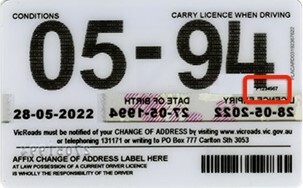
When was your driver’s licence issued?
Your licence or learner permit was issued after November 2022, or your licence or learner permit was re-issued due to a data breach.
Location of your card number
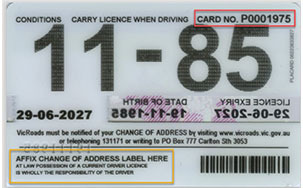
Your driver’s licence card number is also shown in your VicRoads account – go to vicroads.vic.gov.au to log in.
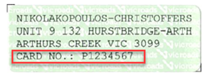
If you’ve changed your address, this sticker will be on the bottom left at the back of the card and it will show your card number.
Location of your card number
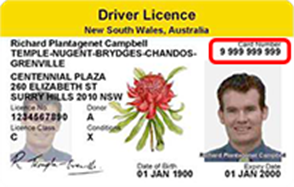
Location of your card number
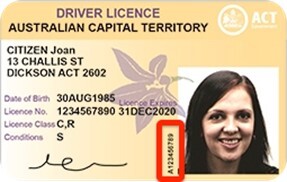
When was your driver’s licence issued?
Your licence was issued before 10 December 2020.
Location of your card number
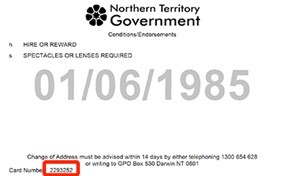
When was your driver’s licence issued?
Your licence was issued from 10 December 2020 onwards.
Location of your card number
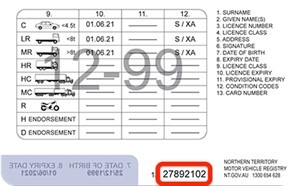
When was your driver’s licence issued?
Your licence was issued before June 2019.
Location of your card number
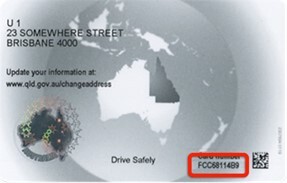
When was your driver’s licence issued?
Your licence was issued after June 2019.
Location of your card number
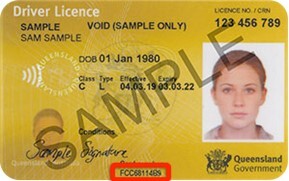
Location of your card number
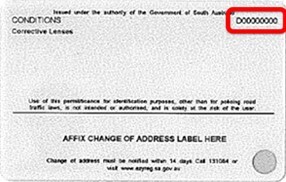
Location of your card number
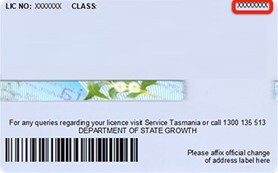
Location of your card number
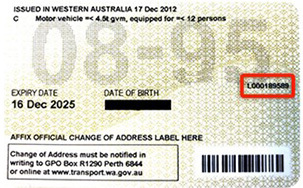
More information
When you’re providing your driver’s licence details to us, please make sure they match the details on your Media Super account. This will help us confirm the request is coming from the right person.
You can also check out our ID Requirements brochure which explains:
- The different ways you can provide proof of your identity,
- Which documents you need to give us, depending on your request,
- How to get documents certified, and
- Hints, tips and troubleshooting.